|
Computer Accessories
Digital Cameras
Audio Multimedia
PDA Accessories
|
|
Power-Supplier.co.uk › Replacement Laptop Batteries › Replacement MSI Laptop Batteries (Laptop models list) › MS-14D1 Battery |
|
Click to Enlarge
List price: EUR 56.48
Special Price: EUR 23.25
Brand New, 'A' Grade Cells, Three Years Warranty
Money-Back Guarantee

|
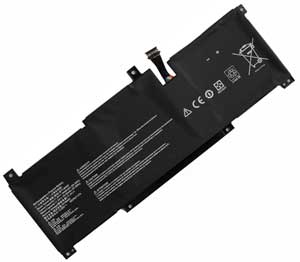
Replacement for MSI MS-14D1 Laptop Battery From ELEC
If your original part number or laptop model is not included in the compatibility list, our battery may still fit your laptop. Please feel free to contact us at service@power-supplier.co.uk for confirmation. |
| Battery Type: |
Li-ion 39.3Wh |
| Voltage: |
11.4V |
| Color: |
Black |
| Capacity: |
39.3Wh / 3448mAh |
| Dimension: |
mm |
| Condition: |
New |
| Reusability: |
Rechargeable |
| Inventory: |
in stock |
|
|
|
|
|
|
| Product Type: Replacement Battery, Rechargeable (Brand New)
Highest quality battery cells
Guaranteed to meet or exceed the specifications of the original.
100% original manufacturer compatible, this replacement MS-14D1 battery has been tested, and validated on systems to ensure it will work with your notebook.
Warranty: 36 Months Warranty.
Wholesale Price, Fast Delivery. Secure Online Ordering GuaranteedThe shipping cost for each order is EUR 5.95.
|
This Laptop Battery can replace the following part numbers:
MSI
BTY-M493,
This Laptop Battery is also compatible with the following models:
MSI
Modern 14 B10RBSW, Prestige 14 Intel 11th Gen, Prestige 14 A11SCX,
MS-14D1, Summit E14 A11SCS, Prestige 14 Hands-On A10M,
Prestige 14 A10SC-009 i7-10710U, Modern 14 B11SB, Prestige 14 Rose Pink,
Prestige 14 B10MW B10MW-017US, Prestige 14 A10RB Series, |
| |
Choosing the right Charger / AC adapter:Before you buy any AC laptop adapter, please make sure the AC laptop adapter will give you the correct voltage and suitable current output.
Choose the right charger. Firstly, check the compatible brand. Secondly, check the output voltage and current, such as 19V 3.33A, which can be seen on the label of your laptop charger or at the bottom of the laptop. Thirdly, check the connection port.
|
| |
|
|