|
Computer Accessories
Digital Cameras
Audio Multimedia
PDA Accessories
|
|
Power-Supplier.co.uk › Replacement Laptop Batteries › Replacement LENOVO Laptop Batteries (Laptop models list) › L20C3PF0 Battery |
|
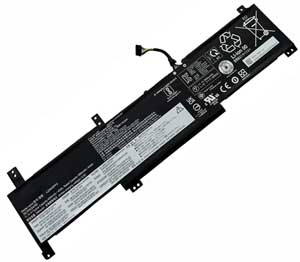
Click to Enlarge
List price: £ 55.02
Special Price: £ 24.28
inc. VAT
Brand New, 'A' Grade Cells, Three Years Warranty
Money-Back Guarantee
 |
Replacement for LENOVO L20C3PF0 Laptop Battery From ELEC
If your original part number or laptop model is not included in the compatibility list, our battery may still fit your laptop. Please feel free to contact us at service@power-supplier.co.uk for confirmation. |
| Battery Type: |
Li-ion 45Wh |
| Voltage: |
11.1V |
| Color: |
Black |
| Capacity: |
45Wh / 4050mAh |
| Dimension: |
mm |
| Condition: |
New |
| Reusability: |
Rechargeable |
| Inventory: |
in stock |
|
|
|
|
|
|
| Product Type: Replacement Battery, Rechargeable (Brand New)
Highest quality battery cells
Guaranteed to meet or exceed the specifications of the original.
100% original manufacturer compatible, this L20C3PF0 battery has been tested, and validated on systems to ensure it will work with your notebook.
Quality Assurance: All products are Certified by CE, FCC for safety. Strict guidelines for compatibility, and standards compliance for environment safety.We specialize in providing quality products from and quality customer service.
Warranty: 36 Months Warranty.
Wholesale Price, Fast Delivery. Secure Online Ordering GuaranteedThe shipping cost for each order is £ 5.95.
|
This Laptop Battery can replace the following part numbers:
LENOVO
L20C3PF0, L20M3PF0, 5B11B36275,
L20L3PF0, SSB11B36277,
This Laptop Battery is also compatible with the following models:
LENOVO
IdeaPad 3-14ITL6 82H7002EMX, IdeaPad 3-14ITL6 82H700B5MX, IdeaPad 3-14ITL6 82H700DNVN,
IdeaPad 3-14ITL6 82H700K0MB, IdeaPad 3-14ITL6(82H700BHGE), IdeaPad 3-15ALC6 82KU008PGE,
IdeaPad 3-15ALC6 82KU00DPCK, IdeaPad 3-15ALC6(82KU0041GE), IdeaPad 3-15ITL6 82H8005RBM,
IdeaPad 3-15ITL6 82H800HPMJ, IdeaPad 3-15ITL6 82H800NSCK, IdeaPad 3-15ITL6(82H80083GE),
IdeaPad 3-15ITL6(82H800KCGE), IdeaPad 3-17ALC6 82KV0007MX, IdeaPad 3-17ALC6 82KV0027CK,
IdeaPad 3-17ALC6 82KV0049MH, IdeaPad 3-17ALC6(82KV002NGE), IdeaPad 3-17ITL6 82H9004HMX,
IdeaPad 3-17ITL6 82H9007DCK, IdeaPad 3-17ITL6(82H90045GE), IdeaPad 3-14ITL6 82H7009DHH,
IdeaPad 3-14ITL6 82H700DAMJ, IdeaPad 3-14ITL6 82H700E3TA, IdeaPad 3-14ITL6(82H7005JGE),
IdeaPad 3-15ALC6 82KU003NUS, IdeaPad 3-15ALC6 82KU00BLTA, IdeaPad 3-15ALC6 82KU00MVMH,
IdeaPad 3-15ITL6 82H80006US, IdeaPad 3-15ITL6 82H800EBIV, IdeaPad 3-15ITL6 82H800JATA,
IdeaPad 3-15ITL6 82H801DHIN, IdeaPad 3-15ITL6(82H800G2GE), IdeaPad 3-17ALC6,
IdeaPad 3-17ALC6 82KV0014SC, IdeaPad 3-17ALC6 82KV003EIV, IdeaPad 3-17ALC6(82KV001WGE),
IdeaPad 3-17ITL6 82H9003WFR, IdeaPad 3-17ITL6 82H9006HGE, IdeaPad 3-17ITL6 82H9009NMB,
IdeaPad 3-14ITL6 82H70047PH, IdeaPad 3-14ITL6 82H700D6VN, IdeaPad 3-14ITL6 82H700E0TA,
IdeaPad 3-14ITL6 82H700KYIN, IdeaPad 3-15ALC6 82KU002BFR, IdeaPad 3-15ALC6 82KU00AQMJ,
IdeaPad 3-15ALC6 82KU00FKIV, IdeaPad 3-15ALC6(82KU0043GE), IdeaPad 3-15ITL6 82H800AYSB,
IdeaPad 3-15ITL6 82H800J7TA, IdeaPad 3-15ITL6 82H800SBMH, IdeaPad 3-15ITL6(82H80085GE),
IdeaPad 3-15ITL6(82MD), IdeaPad 3-17ALC6 82KV000LFR, IdeaPad 3-17ALC6 82KV002JCY,
IdeaPad 3-17ALC6 82KV004FRK, IdeaPad 3-17ITL6 82H9000JMX, IdeaPad 3-17ITL6 82H9004PSC,
IdeaPad 3-17ITL6 82H9007LRE, IdeaPad 3-17ITL6(82H90047GE), IdeaPad 3-14ITL6,
IdeaPad 3-14ITL6 82H700AERM, IdeaPad 3-14ITL6 82H700DCMJ, IdeaPad 3-14ITL6 82H700GSID,
IdeaPad 3-14ITL6(82H700AKGE), IdeaPad 3-15ALC6 82KU0083PG, IdeaPad 3-15ALC6 82KU00BVGE,
IdeaPad 3-15ALC6(82KU), IdeaPad 3-15ITL6 82H80042VN, IdeaPad 3-15ITL6 82H800GUHH,
IdeaPad 3-15ITL6 82H800NKCK, IdeaPad 3-15ITL6(82H8), IdeaPad 3-15ITL6(82H800KBGE),
IdeaPad 3-17ALC6 82kv0003mx, IdeaPad 3-17ALC6 82KV001RMX, IdeaPad 3-17ALC6 82KV003KRE,
IdeaPad 3-17ALC6(82KV002BGE), IdeaPad 3-17ITL6 82H9004ESC, IdeaPad 3-17ITL6 82H9007CCK,
IdeaPad 3-17ITL6(82H90044GE), IdeaPad 3-14ITL6 82H7004NRK, IdeaPad 3-14ITL6 82H700D8MJ,
IdeaPad 3-14ITL6 82H700E2TA, IdeaPad 3-14ITL6(82H7), IdeaPad 3-15ALC6 82KU002LFR,
IdeaPad 3-15ALC6 82KU00ASMJ, IdeaPad 3-15ALC6 82KU00L8MH, IdeaPad 3-15ITL6,
IdeaPad 3-15ITL6 82H800CYIV, IdeaPad 3-15ITL6 82H800J9TA, IdeaPad 3-15ITL6 82H8014BIN,
IdeaPad 3-15ITL6(82H800FUGE), IdeaPad 3-15ITL6(82MD0002BR), IdeaPad 3-17ALC6 82KV0013RE,
IdeaPad 3-17ALC6 82KV0038MH, IdeaPad 3-17ALC6(82KV), IdeaPad 3-17ITL6 82H9001SIV,
IdeaPad 3-17ITL6 82H9006ECY, IdeaPad 3-17ITL6 82H9008UMH, IdeaPad 3-17ITL6(82H900A6GE),
IdeaPad 3-14ITL6 82H7003UVN, IdeaPad 3-14ITL6 82H700BBCK, IdeaPad 3-14ITL6 82H700DYTA,
IdeaPad 3-14ITL6 82H700KAIN, IdeaPad 3-15ALC6, IdeaPad 3-15ALC6 82KU00APMJ,
IdeaPad 3-15ALC6 82KU00EMAX, IdeaPad 3-15ALC6(82KU0042GE), IdeaPad 3-15ITL6 82H8008YHV,
IdeaPad 3-15ITL6 82H800HRMJ, IdeaPad 3-15ITL6 82H800P8MJ, IdeaPad 3-15ITL6(82H80084GE),
IdeaPad 3-15ITL6(82H800KDGE), IdeaPad 3-17ALC6 82KV000KFR, IdeaPad 3-17ALC6 82KV002FCY,
IdeaPad 3-17ALC6 82KV004AMH, IdeaPad 3-17ITL6, IdeaPad 3-17ITL6 82H9004JYA,
IdeaPad 3-17ITL6 82H9007EMH, IdeaPad 3-17ITL6(82H90046GE), IdeaPad 3-14ITL6 82H7009JSB,
IdeaPad 3-14ITL6 82H700DBMJ, IdeaPad 3-14ITL6 82H700GRID, IdeaPad 3-14ITL6(82H700AJGE),
IdeaPad 3-15ALC6 82KU006VRM, IdeaPad 3-15ALC6 82KU00BNTA, IdeaPad 3-15ALC6 82KU00MYMH,
IdeaPad 3-15ITL6 82H8000DUS, IdeaPad 3-15ITL6 82H800G6US, IdeaPad 3-15ITL6 82H800K1US,
IdeaPad 3-15ITL6 82HL0006HH, IdeaPad 3-15ITL6(82H800JYGE), IdeaPad 3-17ALC6 82KV0002MX,
IdeaPad 3-17ALC6 82KV001DBM, IdeaPad 3-17ALC6 82KV003JMZ, IdeaPad 3-17ALC6(82KV0025GE),
IdeaPad 3-17ITL6 82H9003XFR, IdeaPad 3-17ITL6 82H9006UGE, IdeaPad 3-17ITL6(82H9),
IdeaPad 3-14ITL6 82H70048PH, IdeaPad 3-14ITL6 82H700D7MJ, IdeaPad 3-14ITL6 82H700E1TA,
IdeaPad 3-14ITL6 82H700MYID, IdeaPad 3-15ALC6 82KU002FFR, IdeaPad 3-15ALC6 82KU00ARMJ,
IdeaPad 3-15ALC6 82KU00FVTA, IdeaPad 3-15ALC6(82KU008LGE), IdeaPad 3-15ITL6 82H800B9TW,
IdeaPad 3-15ITL6 82H800J8TA, IdeaPad 3-15ITL6 82H800TUMH, IdeaPad 3-15ITL6(82H800BXGE),
IdeaPad 3-15ITL6(82MD0000BR), IdeaPad 3-17ALC6 82KV000SGE, IdeaPad 3-17ALC6 82KV002NGE,
IdeaPad 3-17ALC6 82KV006MGE, IdeaPad 3-17ITL6 82H9001GIV, IdeaPad 3-17ITL6 82H90058RE,
IdeaPad 3-17ITL6 82H90080FR, IdeaPad 3-17ITL6(82H9006FGE), |
| |
Choosing the right Charger / AC adapter:Before you buy any AC laptop adapter, please make sure the AC laptop adapter will give you the correct voltage and suitable current output.
Choose the right charger. Firstly, check the compatible brand. Secondly, check the output voltage and current, such as 19V 3.33A, which can be seen on the label of your laptop charger or at the bottom of the laptop. Thirdly, check the connection port.
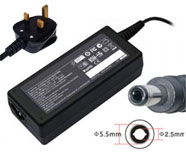
Click to Enlarge
Replacement Laptop Charger / AC Adapter for LENOVO
Voltage: 19V(Output), 3.42A(Output Current)
Power: 65W
Connector Size: 5.5*2.5
|
Click to Enlarge
Replacement Laptop Charger / AC Adapter for LENOVO
Voltage: 19V(Output), 4.74A(Output Current)
Power: 90W
Connector Size: 5.5*2.5
|
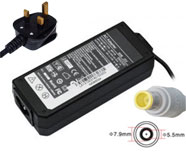
Click to Enlarge
Replacement Laptop Charger / AC Adapter for LENOVO
Voltage: 20V(Output), 3.25A(Output Current)
Power: 65W
Connector Size: 7.9*5.5
|
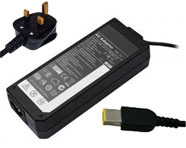
Click to Enlarge
Replacement Laptop Charger / AC Adapter for LENOVO
Voltage: 20V(Output), 3.25A(Output Current)
Power: 65W
Connector Size: slim tip
|
Click to Enlarge
Replacement Laptop Charger / AC Adapter for LENOVO
Voltage: 20V(Output), 4.5A(Output Current)
Power: 90W
Connector Size: slim tip
|
Click to Enlarge
Replacement Laptop Charger / AC Adapter for LENOVO
Voltage: 20V(Output), 4.5A(Output Current)
Power: 90W
Connector Size: 7.9*5.5
|
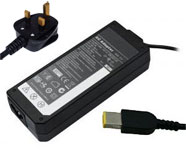
Click to Enlarge
Replacement Laptop Charger / AC Adapter for LENOVO
Voltage: 20V(Output), 2.25A(Output Current)
Power: 45W
Connector Size: slim tip
|
|
|
| |
|
|