|
Computer Accessories
Digital Cameras
Audio Multimedia
PDA Accessories
|
|
Power-Supplier.co.uk › Replacement Laptop Batteries › Replacement LENOVO Laptop Batteries (Laptop models list) › L18D3PF2 Battery |
|
Click to Enlarge
List price: £ 64.13
Special Price: £ 30.35
inc. VAT
Brand New, 'A' Grade Cells, Three Years Warranty
Money-Back Guarantee
 |
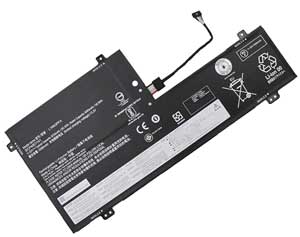
Replacement for LENOVO L18D3PF2 Laptop Battery From ELEC
If your original part number or laptop model is not included in the compatibility list, our battery may still fit your laptop. Please feel free to contact us at service@power-supplier.co.uk for confirmation. |
| Battery Type: |
Li-ion 60.3Wh |
| Voltage: |
11.52V |
| Color: |
Black |
| Capacity: |
60.3Wh / 5235mAh |
| Dimension: |
mm |
| Condition: |
New |
| Reusability: |
Rechargeable |
| Inventory: |
in stock |
|
|
|
|
|
|
| Product Type: Replacement Battery, Rechargeable (Brand New)
Highest quality battery cells
Guaranteed to meet or exceed the specifications of the original.
100% original manufacturer compatible, this L18D3PF2 battery has been tested, and validated on systems to ensure it will work with your notebook.
Quality Assurance: All products are Certified by CE, FCC for safety. Strict guidelines for compatibility, and standards compliance for environment safety.We specialize in providing quality products from and quality customer service.
Warranty: 36 Months Warranty.
Wholesale Price, Fast Delivery. Secure Online Ordering GuaranteedThe shipping cost for each order is £ 5.95.
|
This Laptop Battery can replace the following part numbers:
LENOVO
L18M3PFA, 5B10T83740, L18D3PF2,
5B10T83739, SB10W67375, 5B10W67258,
3ICP4-67-141,
This Laptop Battery is also compatible with the following models:
LENOVO
Yoga C740-15IML 81TD0006US, Yoga C740-15IML 81TD000EMH, Yoga C740-15IML 81TD000NKR,
Yoga C740-15IML 81TD000WSP, Yoga C740-15IML 81TD0016FR, Yoga C740-15IML 81TD001EHH,
Yoga C740-15IML 81TD001QRU, Yoga C740-15IML 81TD001YUS, Yoga C740-15IML 81TD0027TA,
Yoga C740-15IML 81TD002JCY, Yoga C740-15IML 81TD002SIV, Yoga C740-15IML 81TD0031IV,
Yoga C740-15IML 81TD0039FR, Yoga C740-15IML 81TD003HMB, Yoga C740-15IML 81TD003RTW,
Yoga C740-15IML 81TD0042SB, Yoga C740-15IML 81TD004ARK, Yoga C740-15IML 81TD004KAU,
Yoga C740-15IML 81TD004TMZ, Yoga C740-15IML 81TD0052SA, Yoga C740-15IML 81TD005BCK,
Yoga C740-15IML 81TD005KJP, Yoga C740-15IML 81TD005UHV, Yoga C740-15IML 81TD0063US,
Yoga C740-15IML 81TD006BKR, Yoga C740-15IML 81TD006KMJ, Yoga C740-15IML 81TD006TPB,
Yoga C740-15IML 81TD0072FR, Yoga C740-15IML(81TD004GGE), Yoga C740-15IML 81TD0000PH,
Yoga C740-15IML 81TD000BTX, Yoga C740-15IML 81TD000KCK, Yoga C740-15IML 81TD000TUK,
Yoga C740-15IML 81TD0013FR, Yoga C740-15IML 81TD001BSB, Yoga C740-15IML 81TD001MGE,
Yoga C740-15IML 81TD001VHH, Yoga C740-15IML 81TD0024MZ, Yoga C740-15IML 81TD002CMJ,
Yoga C740-15IML 81TD002PHV, Yoga C740-15IML 81TD002XIV, Yoga C740-15IML 81TD0036IV,
Yoga C740-15IML 81TD003EMH, Yoga C740-15IML 81TD003NPH, Yoga C740-15IML 81TD003WMJ,
Yoga C740-15IML 81TD0047KR, Yoga C740-15IML 81TD004FVN, Yoga C740-15IML 81TD004QFR,
Yoga C740-15IML 81TD004YFR, Yoga C740-15IML 81TD0058CK, Yoga C740-15IML 81TD005GJP,
Yoga C740-15IML 81TD005QMJ, Yoga C740-15IML 81TD0060JP, Yoga C740-15IML 81TD0068LM,
Yoga C740-15IML 81TD006GTW, Yoga C740-15IML 81TD006QPB, Yoga C740-15IML 81TD006YPB,
Yoga C740-15IML(81TD001LGE), Yoga C740-15IML 81TD0008US, Yoga C740-15IML 81TD000GCK,
Yoga C740-15IML 81TD000QKR, Yoga C740-15IML 81TD000YMX, Yoga C740-15IML 81TD0018MZ,
Yoga C740-15IML 81TD001HGM, Yoga C740-15IML 81TD001SRU, Yoga C740-15IML 81TD0021RM,
Yoga C740-15IML 81TD0029TW, Yoga C740-15IML 81TD002LMH, Yoga C740-15IML 81TD002UIV,
Yoga C740-15IML 81TD0033IV, Yoga C740-15IML 81TD003BMH, Yoga C740-15IML 81TD003KMB,
Yoga C740-15IML 81TD003TTA, Yoga C740-15IML 81TD0044HH, Yoga C740-15IML 81TD004CHH,
Yoga C740-15IML 81TD004MAD, Yoga C740-15IML 81TD004VTW, Yoga C740-15IML 81TD0054TW,
Yoga C740-15IML 81TD005DCK, Yoga C740-15IML 81TD005MSC, Yoga C740-15IML 81TD005WHV,
Yoga C740-15IML 81TD0065MB, Yoga C740-15IML 81TD006DKR, Yoga C740-15IML 81TD006MMH,
Yoga C740-15IML 81TD006VPB, Yoga C740-15IML 81TD0074GE, Yoga C740-15IML 81TD0005US,
Yoga C740-15IML 81TD000DMH, Yoga C740-15IML 81TD000MKR, Yoga C740-15IML 81TD000VSP,
Yoga C740-15IML 81TD0015FR, Yoga C740-15IML 81TD001DHH, Yoga C740-15IML 81TD001PAD,
Yoga C740-15IML 81TD001XRU, Yoga C740-15IML 81TD0026TA, Yoga C740-15IML 81TD002HRK,
Yoga C740-15IML 81TD002RIV, Yoga C740-15IML 81TD0030IV, Yoga C740-15IML 81TD0038IV,
Yoga C740-15IML 81TD003GMB, Yoga C740-15IML 81TD003QTW, Yoga C740-15IML 81TD0041SB,
Yoga C740-15IML 81TD0049KR, Yoga C740-15IML 81TD004JMX, Yoga C740-15IML 81TD004SNZ,
Yoga C740-15IML 81TD0051AU, Yoga C740-15IML 81TD005ACK, Yoga C740-15IML 81TD005JJP,
Yoga C740-15IML 81TD005TMB, Yoga C740-15IML 81TD0062RM, Yoga C740-15IML 81TD006AKR,
Yoga C740-15IML 81TD006JMJ, Yoga C740-15IML 81TD006SPB, Yoga C740-15IML 81TD0071FR,
Yoga C740-15IML(81TD0040GE), Yoga C740-15IML, Yoga C740-15IML 81TD000ATX,
Yoga C740-15IML 81TD000JCK, Yoga C740-15IML 81TD000SUK, Yoga C740-15IML 81TD0012MX,
Yoga C740-15IML 81TD001ASB, Yoga C740-15IML 81TD001KMZ, Yoga C740-15IML 81TD001UIX,
Yoga C740-15IML 81TD0023MZ, Yoga C740-15IML 81TD002BMJ, Yoga C740-15IML 81TD002NRU,
Yoga C740-15IML 81TD002WIV, Yoga C740-15IML 81TD0035IV, Yoga C740-15IML 81TD003DMH,
Yoga C740-15IML 81TD003MMB, Yoga C740-15IML 81TD003VMJ, Yoga C740-15IML 81TD0046KR,
Yoga C740-15IML 81TD004ERA, Yoga C740-15IML 81TD004PFR, Yoga C740-15IML 81TD004XTW,
Yoga C740-15IML 81TD0057RK, Yoga C740-15IML 81TD005FMH, Yoga C740-15IML 81TD005PMJ,
Yoga C740-15IML 81TD005YJP, Yoga C740-15IML 81TD0067MH, Yoga C740-15IML 81TD006FTW,
Yoga C740-15IML 81TD006PAU, Yoga C740-15IML 81TD006XPB, Yoga C740-15IML 81TD0076RU,
Yoga C740-15IML 81TD0007US, Yoga C740-15IML 81TD000FCK, Yoga C740-15IML 81TD000PKR,
Yoga C740-15IML 81TD000XPH, Yoga C740-15IML 81TD0017FR, Yoga C740-15IML 81TD001FHH,
Yoga C740-15IML 81TD001RRU, Yoga C740-15IML 81TD0020US, Yoga C740-15IML 81TD0028TW,
Yoga C740-15IML 81TD002KMH, Yoga C740-15IML 81TD002TIV, Yoga C740-15IML 81TD0032IV,
Yoga C740-15IML 81TD003AMZ, Yoga C740-15IML 81TD003JMB, Yoga C740-15IML 81TD003STA,
Yoga C740-15IML 81TD0043SB, Yoga C740-15IML 81TD004BHH, Yoga C740-15IML 81TD004LMX,
Yoga C740-15IML 81TD004UMZ, Yoga C740-15IML 81TD0053TW, Yoga C740-15IML 81TD005CCK,
Yoga C740-15IML 81TD005LPH, Yoga C740-15IML 81TD005VHV, Yoga C740-15IML 81TD0064HH,
Yoga C740-15IML 81TD006CKR, Yoga C740-15IML 81TD006LMH, Yoga C740-15IML 81TD006UPB,
Yoga C740-15IML 81TD0073FR, Yoga C740-15IML 81TD0003US, Yoga C740-15IML 81TD000CTX,
Yoga C740-15IML 81TD000LCK, Yoga C740-15IML 81TD000UUK, Yoga C740-15IML 81TD0014FR,
Yoga C740-15IML 81TD001CHH, Yoga C740-15IML 81TD001NAD, Yoga C740-15IML 81TD001WRU,
Yoga C740-15IML 81TD0025TA, Yoga C740-15IML 81TD002DMJ, Yoga C740-15IML 81TD002QIV,
Yoga C740-15IML 81TD002YIV, Yoga C740-15IML 81TD0037IV, Yoga C740-15IML 81TD003FMH,
Yoga C740-15IML 81TD003PTW, Yoga C740-15IML 81TD003XMJ, Yoga C740-15IML 81TD0048KR,
Yoga C740-15IML 81TD004HMX, Yoga C740-15IML 81TD004RFR, Yoga C740-15IML 81TD0050FR,
Yoga C740-15IML 81TD0059CK, Yoga C740-15IML 81TD005HJP, Yoga C740-15IML 81TD005SSB,
Yoga C740-15IML 81TD0061JP, Yoga C740-15IML 81TD0069LM, Yoga C740-15IML 81TD006HMJ,
Yoga C740-15IML 81TD006RPB, Yoga C740-15IML 81TD0070HH, Yoga C740-15IML(81TD003YGE),
Yoga C740-15, Yoga C740-15IML 81TD0009SB, Yoga C740-15IML 81TD000HCK,
Yoga C740-15IML 81TD000RUK, Yoga C740-15IML 81TD0010MX, Yoga C740-15IML 81TD0019SB,
Yoga C740-15IML 81TD001JBM, Yoga C740-15IML 81TD001TRU, Yoga C740-15IML 81TD0022MZ,
Yoga C740-15IML 81TD002ATW, Yoga C740-15IML 81TD002MMH, Yoga C740-15IML 81TD002VIV,
Yoga C740-15IML 81TD0034IV, Yoga C740-15IML 81TD003CMH, Yoga C740-15IML 81TD003LMB,
Yoga C740-15IML 81TD003UTA, Yoga C740-15IML 81TD0045AU, Yoga C740-15IML 81TD004DRU,
Yoga C740-15IML 81TD004NAD, Yoga C740-15IML 81TD004WTW, Yoga C740-15IML 81TD0056RK,
Yoga C740-15IML 81TD005EMH, Yoga C740-15IML 81TD005NMJ, Yoga C740-15IML 81TD005XJP,
Yoga C740-15IML 81TD0066MH, Yoga C740-15IML 81TD006EMZ, Yoga C740-15IML 81TD006NMH,
Yoga C740-15IML 81TD006WPB, Yoga C740-15IML 81TD0075PB, |
| |
Choosing the right Charger / AC adapter:Before you buy any AC laptop adapter, please make sure the AC laptop adapter will give you the correct voltage and suitable current output.
Choose the right charger. Firstly, check the compatible brand. Secondly, check the output voltage and current, such as 19V 3.33A, which can be seen on the label of your laptop charger or at the bottom of the laptop. Thirdly, check the connection port.
Click to Enlarge
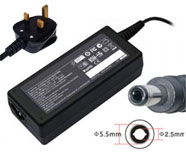
Replacement Laptop Charger / AC Adapter for LENOVO
Voltage: 19V(Output), 3.42A(Output Current)
Power: 65W
Connector Size: 5.5*2.5
|
Click to Enlarge
Replacement Laptop Charger / AC Adapter for LENOVO
Voltage: 19V(Output), 4.74A(Output Current)
Power: 90W
Connector Size: 5.5*2.5
|
Click to Enlarge
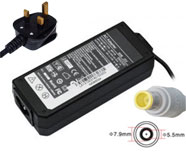
Replacement Laptop Charger / AC Adapter for LENOVO
Voltage: 20V(Output), 3.25A(Output Current)
Power: 65W
Connector Size: 7.9*5.5
|
Click to Enlarge
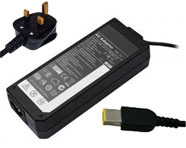
Replacement Laptop Charger / AC Adapter for LENOVO
Voltage: 20V(Output), 3.25A(Output Current)
Power: 65W
Connector Size: slim tip
|
Click to Enlarge
Replacement Laptop Charger / AC Adapter for LENOVO
Voltage: 20V(Output), 4.5A(Output Current)
Power: 90W
Connector Size: slim tip
|
Click to Enlarge
Replacement Laptop Charger / AC Adapter for LENOVO
Voltage: 20V(Output), 4.5A(Output Current)
Power: 90W
Connector Size: 7.9*5.5
|
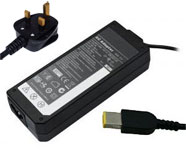
Click to Enlarge
Replacement Laptop Charger / AC Adapter for LENOVO
Voltage: 20V(Output), 2.25A(Output Current)
Power: 45W
Connector Size: slim tip
|
|
|
| |
|
|