|
Computer Accessories
Digital Cameras
Audio Multimedia
PDA Accessories
|
|
Power-Supplier.co.uk › Replacement Laptop Batteries › Replacement LENOVO Laptop Batteries (Laptop models list) › 01AV471 Battery |
|
Click to Enlarge
List price: £ 46.13
Special Price: £ 18.35
inc. VAT
Brand New, 'A' Grade Cells, Three Years Warranty
Money-Back Guarantee
 |
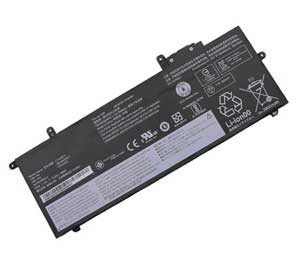
Replacement for LENOVO 01AV471 Laptop Battery From ELEC
If your original part number or laptop model is not included in the compatibility list, our battery may still fit your laptop. Please feel free to contact us at service@power-supplier.co.uk for confirmation. |
| Battery Type: |
Li-ion 48Wh |
| Voltage: |
11.4V |
| Color: |
Black |
| Capacity: |
48Wh / mAh |
| Dimension: |
mm |
| Condition: |
New |
| Reusability: |
Rechargeable |
| Inventory: |
in stock |
|
|
|
|
|
|
| Product Type: Replacement Battery, Rechargeable (Brand New)
Highest quality battery cells
Guaranteed to meet or exceed the specifications of the original.
100% original manufacturer compatible, this 01AV471 battery has been tested, and validated on systems to ensure it will work with your notebook.
Quality Assurance: All products are Certified by CE, FCC for safety. Strict guidelines for compatibility, and standards compliance for environment safety.We specialize in providing quality products from and quality customer service.
Warranty: 36 Months Warranty.
Wholesale Price, Fast Delivery. Secure Online Ordering GuaranteedThe shipping cost for each order is £ 5.95.
|
This Laptop Battery can replace the following part numbers:
LENOVO
5B10W13920, SB10K97617, 01AV472,
L17M6P71, SB10T83164, 5B10W13922,
SB10K97619, 3ICP6-38-64-2, L17S6P71,
01AV471, L17L6P71, SB10T83163,
5B10W13921, SB10K97618, 01AV484,
L17M6P72, SB10T83165, 01AV470,
L17C6P71, SB10K97628,
This Laptop Battery is also compatible with the following models:
LENOVO
ThinkPad A285-81H0 20MX 20MW, ThinkPad X280 20KES0N700, ThinkPad X280 20KES1E82S,
ThinkPad X280 20KES1PP00, ThinkPad X280 20KES23200, ThinkPad X280 20KES2SN2M,
ThinkPad X280 20KES3400F, ThinkPad X280 20KES3EJ0F, ThinkPad X280 20KES4AK02,
ThinkPad X280 20KES5CM00, ThinkPad X280 20KES5XL00, ThinkPad X280 20KES6DH4R,
ThinkPad X280 20KES7SA00, ThinkPad X280 20KES9K312, ThinkPad X280 20KESBAS00,
ThinkPad X280 20KESC8F0R, ThinkPad X280 20KESDL400, ThinkPad X280 20KF0061AU,
ThinkPad X280 20KFS0JQ00, ThinkPad X280(20KFA000CD), ThinkPad X280(20KFA00ACD),
ThinkPad X280(20KFA02FCD), ThinkPad X280-20KES01S0, TP X280 20KES2680J,
TP X280 20KES6BX00, TP X280 x20KFS0R400, ThinkPad A285(20MW000KGE),
ThinkPad X280 20KEA06GAU, ThinkPad X280 20KES1D000, ThinkPad X280 20KES1JT00,
ThinkPad X280 20KES1X61A, ThinkPad X280 20KES2MU00, ThinkPad X280 20KES32V0J,
ThinkPad X280 20KES37L03, ThinkPad X280 20KES4140D, ThinkPad X280 20KES4VX00,
ThinkPad X280 20KES5SD0U, ThinkPad X280 20KES64R06, ThinkPad X280 20KES7EV02,
ThinkPad X280 20KES9B706, ThinkPad X280 20KESAQQ2M, ThinkPad X280 20KESBHG00,
ThinkPad X280 20KESCYG00, ThinkPad X280 20KF004SAU, ThinkPad X280 20KFS08C00,
ThinkPad X280 AHK, ThinkPad X280(20KFA007CD), ThinkPad X280(20KFA01VCD),
ThinkPad X280(2CCD), TP X280 20KES0Y800, TP X280 20KES5860D,
TP X280 20KF003TAU, ThinkPad X280 20KE000QAU, ThinkPad X280 20KES0X501,
ThinkPad X280 20KES1H000, ThinkPad X280 20KES1T700, ThinkPad X280 20KES2B90C,
ThinkPad X280 20KES2U11V, ThinkPad X280 20KES35A00, ThinkPad X280 20KES3KG00,
ThinkPad X280 20KES4G00E, ThinkPad X280 20KES5JK1R, ThinkPad X280 20KES61T0X,
ThinkPad X280 20KES6PP14, ThinkPad X280 20KES8AQ00, ThinkPad X280 20KES9VT01,
ThinkPad X280 20KESBDP00, ThinkPad X280 20KESCJ900, ThinkPad X280 20KESEFG1T,
ThinkPad X280 20KFS00J00, ThinkPad X280 20KFS0RL00, ThinkPad X280(20KFA002CD),
ThinkPad X280(20KFA00CCD), ThinkPad X280(20KFA02MCD), TP A285 20MXS0QE00,
TP X280 20KES3QK08, TP X280 20KES7RG00, ThinkPad A285(20MX0002GE),
ThinkPad X280 20KES0D90J, ThinkPad X280 20KES1E40M, ThinkPad X280 20KES1M304,
ThinkPad X280 20KES1XE00, ThinkPad X280 20KES2SN1S, ThinkPad X280 20KES32W0A,
ThinkPad X280 20KES3A211, ThinkPad X280 20KES47X00, ThinkPad X280 20KES56N2G,
ThinkPad X280 20KES5W108, ThinkPad X280 20KES68111, ThinkPad X280 20KES7F900,
ThinkPad X280 20KES9K30E, ThinkPad X280 20KESBAD00, ThinkPad X280 20KESBTN00,
ThinkPad X280 20KESDKH00, ThinkPad X280 20KF0060AU, ThinkPad X280 20KFS0DV00,
ThinkPad X280(20KF000RCD), ThinkPad X280(20KFA009CD), ThinkPad X280(20KFA02BCD),
ThinkPad X280(2FCD), TP X280 20KES1060F, TP X280 20KES60R00,
TP X280 20KF004UAU, ThinkPad A285 20MWA004AU, ThinkPad X280 20KEA00CHH,
ThinkPad X280 20KES15N11, ThinkPad X280 20KES1J02N, ThinkPad X280 20KES1WP00,
ThinkPad X280 20KES2HJ06, ThinkPad X280 20KES31G0G, ThinkPad X280 20KES35D00,
ThinkPad X280 20KES40V00, ThinkPad X280 20KES4R600, ThinkPad X280 20KES5JL2X,
ThinkPad X280 20KES64M02, ThinkPad X280 20KES73X00, ThinkPad X280 20KES9B004,
ThinkPad X280 20KESAQQ20, ThinkPad X280 20KESBFW24, ThinkPad X280 20KESCYF00,
ThinkPad X280 20KF002RUS, ThinkPad X280 20KFS05V00, ThinkPad X280 20KFS1JB00,
ThinkPad X280(20KFA004CD), ThinkPad X280(20KFA01UCD), ThinkPad X280(20KFA02RCD),
TP X280 20KES0SU10, TP X280 20KES4H30C, TP X280 20KF0008AU,
ThinkPad X280 20KE000FAU, ThinkPad X280 20KES0SU0G, ThinkPad X280 20KES1E831,
ThinkPad X280 20KES1T600, ThinkPad X280 20KES26900, ThinkPad X280 20KES2SP1Q,
ThinkPad X280 20KES35201, ThinkPad X280 20KES3FA00, ThinkPad X280 20KES4BT01,
ThinkPad X280 20KES5JK13, ThinkPad X280 20KES61T0U, ThinkPad X280 20KES6P600,
ThinkPad X280 20KES85F00, ThinkPad X280 20KES9SE0L, ThinkPad X280 20KESBB100,
ThinkPad X280 20KESC9S00, ThinkPad X280 20KESDUA00, ThinkPad X280 20KFA00DAU,
ThinkPad X280 20KFS0QM00, ThinkPad X280(20KFA001CD), ThinkPad X280(20KFA00BCD),
ThinkPad X280(20KFA02GCD), ThinkPad X280-20KES01S00, TP X280 20KES31E01,
TP X280 20KES78500, ThinkPad A285(20MW-20MX), ThinkPad X280 20KES08P0R,
ThinkPad X280 20KES1E40E, ThinkPad X280 20KES1L60C, ThinkPad X280 20KES1X61P,
ThinkPad X280 20KES2PQ00, ThinkPad X280 20KES32V0P, ThinkPad X280 20KES37L0H,
ThinkPad X280 20KES4710H, ThinkPad X280 20KES4YH01, ThinkPad X280 20KES5SE0Q,
ThinkPad X280 20KES65B02, ThinkPad X280 20KES7EV04, ThinkPad X280 20KES9G12V,
ThinkPad X280 20KESB9U00, ThinkPad X280 20KESBSH0J, ThinkPad X280 20KESDDK00,
ThinkPad X280 20KF005YAU, ThinkPad X280 20KFS09Q00, ThinkPad X280 CHK,
ThinkPad X280(20KFA008CD), ThinkPad X280(20KFA01WCD), ThinkPad X280(2ECD),
TP X280 20KES0Y80E, TP X280 20KES5SE0U, TP X280 20KF0042AU,
Thinkpad X280, ThinkPad X280 20KE002EAU, ThinkPad X280 20KES13F29,
ThinkPad X280 20KES1J02H, ThinkPad X280 20KES1U00M, ThinkPad X280 20KES2C30D,
ThinkPad X280 20KES2V900, ThinkPad X280 20KES35C00, ThinkPad X280 20KES3Y000,
ThinkPad X280 20KES4H30F, ThinkPad X280 20KES5JL05, ThinkPad X280 20KES61T0Z,
ThinkPad X280 20KES71015, ThinkPad X280 20KES9142V, ThinkPad X280 20KESA6K16,
ThinkPad X280 20KESBFW10, ThinkPad X280 20KESCQ000, ThinkPad X280 20KESEW000,
ThinkPad X280 20KFS05Q00, ThinkPad X280 20KFS0SY00, ThinkPad X280(20KFA003CD),
ThinkPad X280(20KFA01PCD), ThinkPad X280(20KFA02PCD), TP X280 20KES0L700,
TP X280 20KES4BT1R, TP X280 20KESDV400, |
| |
Choosing the right Charger / AC adapter:Before you buy any AC laptop adapter, please make sure the AC laptop adapter will give you the correct voltage and suitable current output.
Choose the right charger. Firstly, check the compatible brand. Secondly, check the output voltage and current, such as 19V 3.33A, which can be seen on the label of your laptop charger or at the bottom of the laptop. Thirdly, check the connection port.
Click to Enlarge
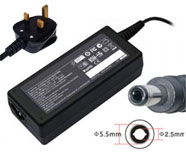
Replacement Laptop Charger / AC Adapter for LENOVO
Voltage: 19V(Output), 3.42A(Output Current)
Power: 65W
Connector Size: 5.5*2.5
|
Click to Enlarge
Replacement Laptop Charger / AC Adapter for LENOVO
Voltage: 19V(Output), 4.74A(Output Current)
Power: 90W
Connector Size: 5.5*2.5
|
Click to Enlarge
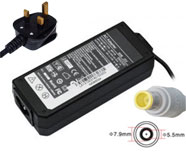
Replacement Laptop Charger / AC Adapter for LENOVO
Voltage: 20V(Output), 3.25A(Output Current)
Power: 65W
Connector Size: 7.9*5.5
|
Click to Enlarge
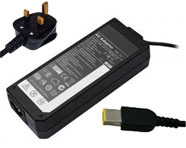
Replacement Laptop Charger / AC Adapter for LENOVO
Voltage: 20V(Output), 3.25A(Output Current)
Power: 65W
Connector Size: slim tip
|
Click to Enlarge
Replacement Laptop Charger / AC Adapter for LENOVO
Voltage: 20V(Output), 4.5A(Output Current)
Power: 90W
Connector Size: slim tip
|
Click to Enlarge
Replacement Laptop Charger / AC Adapter for LENOVO
Voltage: 20V(Output), 4.5A(Output Current)
Power: 90W
Connector Size: 7.9*5.5
|
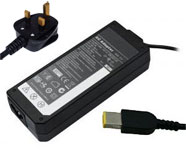
Click to Enlarge
Replacement Laptop Charger / AC Adapter for LENOVO
Voltage: 20V(Output), 2.25A(Output Current)
Power: 45W
Connector Size: slim tip
|
|
|
| |
|
|