|
Computer Accessories
Digital Cameras
Audio Multimedia
PDA Accessories
|
|
Power-Supplier.co.uk › Replacement Laptop Batteries › Replacement LENOVO Laptop Batteries (Laptop models list) › Z41 Battery |
|
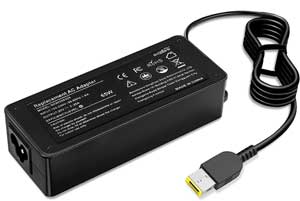
Click to Enlarge
List price: £ 22.49
Special Price: £ 0.39
inc. VAT
Brand New, 'A' Grade Cells, Three Years Warranty
Money-Back Guarantee
 |
Replacement for LENOVO Z41 Laptop Battery From ELEC
If your original part number or laptop model is not included in the compatibility list, our battery may still fit your laptop. Please feel free to contact us at service@power-supplier.co.uk for confirmation. |
| Battery Type: |
Li-ion |
| Voltage: |
20V |
| Color: |
Black |
| Capacity: |
/ 3.25mAh |
| Dimension: |
USB (square tip) mm |
| Condition: |
New |
| Reusability: |
Rechargeable |
| Inventory: |
in stock |
|
|
|
|
|
|
Product Type: Replacement Battery, Rechargeable (Brand New)
Highest quality battery cells
Guaranteed to meet or exceed the specifications of the original.
100% original manufacturer compatible, this Z41 battery has been tested, and validated on systems to ensure it will work with your notebook.
Quality Assurance: All products are Certified by CE, FCC for safety. Strict guidelines for compatibility, and standards compliance for environment safety.We specialize in providing quality products from and quality customer service.
Warranty: 36 Months Warranty.
Wholesale Price, Fast Delivery. Secure Online Ordering GuaranteedThe shipping cost for each order is £ 5.95.
How to purchase batteries correctly?
Method 1: You have to find your specific laptop model before ordering a correct battery.
How to check your laptop model?
Press [Win] + [R] , input "msinfo32" , then click "OK" to find your system model in the pop-up window.
Method 2: Take the battery out of your computer, confirm your original battery part number and appearance, compared with our battery image, make sure that's what you need. |
This Laptop Charger can replace the following part numbers:
This Laptop Charger is also compatible with the following models:
LENOVO
IdeaPad Flex 14, Z41, Ideapad Yoga 2 11,
Thinkpad T431S, Edge 2 15 1580, G50-70,
IdeaPad 500s, IdeaPad S210, IdeaPad Yoga 2 13,
S41, ThinkPad Edge E531, ThinkPad Helix L540,
ThinkPad Helix T460s, ThinkPad S5 Yoga 15, U31-70,
Z70-80, B50, IdeaPad U430p,
G505s, Chromebook N20p, G50-30,
G70-80, IdeaPad Flex 3 14 1470, IdeaPad Yoga 13,
IdeaPad Z410, ThinkPad Edge E455, ThinkPad Edge E565,
ThinkPad Helix T450, ThinkPad Helix X250, ThinkPad Yoga 15 20DQ,
Z50-70, IdeaPad S500, Ideapad 300-17ISK,
G410, B50-70, G40-70,
G51, IdeaPad Flex 2 15 20405, IdeaPad U330P,
IdeaPad Yoga 500, ThinkPad Edge E431, ThinkPad Edge E550,
ThinkPad Helix T431s, ThinkPad Helix T560, ThinkPad X1 Yoga,
Z40, ThinkPad X240, B50-45,
Ideapad U430, G70, Edge 15,
G505, IdeaPad 500, IdeaPad Flex 3 15 1570 ,
Ideapad Yoga 15D, S21e-20, ThinkPad Edge E465,
ThinkPad Helix L450, ThinkPad Helix T460, ThinkPad S3 Yoga 14,
U31, Z70, B40,
ThinkPad S431, G500s, Chromebook N20,
G50, G70-35, IdeaPad Flex 3 11 1120,
IdeaPad Yoga 11S, Ideapad Yoga S1, ThinkPad Edge E450,
ThinkPad Edge E560, ThinkPad Helix T440s, ThinkPad Helix X240,
ThinkPad Yoga 14 20FY, Z50, IdeaPad Flex 15,
Z41-70, Chromebook 11e, B40-80,
G40, G50-80, IdeaPad Flex 10 20324,
IdeaPad S215, IdeaPad Yoga 2 Pro, S41-70,
ThinkPad Edge E540, ThinkPad Helix S431, ThinkPad Helix T550,
ThinkPad X1 Carbon, X260, B50-30,
IdeaPad U530, G510, Chromebook X150E,
G50-45, IdeaPad 300, IdeaPad Flex 3 14 1480,
Ideapad Yoga 15, S21e, ThinkPad Edge E460,
ThinkPad Helix L440, ThinkPad Helix T450s, ThinkPad S1 Yoga 12,
ThinkPad Yoga 260, Z50-75, IdeaPad S510p,
IdeaPad 300-15ISK, G500, B50-80,
G40-80, G510S, IdeaPad Flex 2 15D,
IdeaPad Yoga 11, Ideapad Yoga Flex 14, ThinkPad Edge E440,
ThinkPad Edge E555, ThinkPad Helix T440, ThinkPad Helix W550s,
ThinkPad Yoga 14 20DM, Z40-70, |
| |
Choosing the right Charger / AC adapter:Before you buy any AC laptop adapter, please make sure the AC laptop adapter will give you the correct voltage and suitable current output.
Choose the right charger. Firstly, check the compatible brand. Secondly, check the output voltage and current, such as 19V 3.33A, which can be seen on the label of your laptop charger or at the bottom of the laptop. Thirdly, check the connection port.
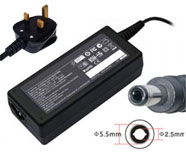
Click to Enlarge
Replacement Laptop Charger / AC Adapter for LENOVO
Voltage: 19V(Output), 3.42A(Output Current)
Power: 65W
Connector Size: 5.5*2.5
|
Click to Enlarge
Replacement Laptop Charger / AC Adapter for LENOVO
Voltage: 19V(Output), 4.74A(Output Current)
Power: 90W
Connector Size: 5.5*2.5
|
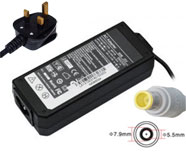
Click to Enlarge
Replacement Laptop Charger / AC Adapter for LENOVO
Voltage: 20V(Output), 3.25A(Output Current)
Power: 65W
Connector Size: 7.9*5.5
|
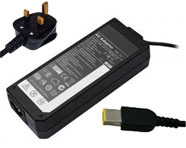
Click to Enlarge
Replacement Laptop Charger / AC Adapter for LENOVO
Voltage: 20V(Output), 3.25A(Output Current)
Power: 65W
Connector Size: slim tip
|
Click to Enlarge
Replacement Laptop Charger / AC Adapter for LENOVO
Voltage: 20V(Output), 4.5A(Output Current)
Power: 90W
Connector Size: slim tip
|
Click to Enlarge
Replacement Laptop Charger / AC Adapter for LENOVO
Voltage: 20V(Output), 4.5A(Output Current)
Power: 90W
Connector Size: 7.9*5.5
|
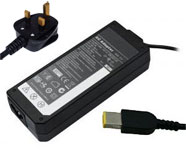
Click to Enlarge
Replacement Laptop Charger / AC Adapter for LENOVO
Voltage: 20V(Output), 2.25A(Output Current)
Power: 45W
Connector Size: slim tip
|
|
|
| |
Restore Your Laptop's Power with Confidence
Engineered for reliability and safety, our replacement LENOVO Z41 battery pack is designed to seamlessly integrate with your laptop and deliver performance that meets or exceeds original specifications. We ensure this through our uncompromising commitment to quality:
Rigorously Tested for Safety: Each battery is built to comply with international safety standards and features robust protection circuits for complete peace of mind.
Built to Last with Quality Cells: We use high-quality cells and advanced engineering to ensure optimal performance and a prolonged lifespan.
Worry-Free Warranty: Your purchase is protected by a comprehensive three-year warranty, guaranteeing long-term satisfaction.
Enjoy a secure, easy online ordering process. Upgrade with confidence today and experience superior battery life.
How to Maximize Your Laptop Battery's Lifespan and Performance
This guide outlines a dual-strategy to get the most from your battery: maximizing the runtime of each charge and protecting its long-term health. Following these principles, based on modern lithium-ion technology, will ensure optimal performance for years to come.
Strategies for Longer Runtime Per Charge
These settings help you get more work done when you're away from an outlet.
Lower Screen Brightness: This is the single most effective way to conserve power.
Use Power-Saving Modes: Enable Windows "Battery Saver" mode to automatically limit background activity and adjust system performance.
Disable Unnecessary Features: Turn off keyboard backlighting, Wi-Fi, Bluetooth, and resource-intensive features like "AI Noise Canceling" when not needed.
Mind Your Workload: Understand that demanding applications like gaming, video editing, and complex software will naturally consume power much faster.
Best Practices for Long-Term Battery Health
These habits minimize wear and tear, preserving your battery's capacity over time.
Utilize Built-In Battery Protection Modes: This is the most important step. Access your laptop's power management settings (e.g., MyASUS, Dell Power Manager, Lenovo Vantage) to enable features like "Battery Health Charging," "Conservation Mode," or "Charge Limit." These modes cap the maximum charge at around 80%, significantly reducing voltage stress and prolonging lifespan.
Avoid Extreme Charge States: Try not to regularly drain the battery below 20% or keep it consistently at 100%. For daily use, maintaining a charge between 20% and 80% is ideal.
Control Temperature; Avoid Extreme Heat: High temperatures are the primary enemy of battery longevity. Never leave your laptop in a hot car, and avoid using it on soft surfaces like beds or sofas that can block ventilation vents.
Additional Important Scenarios
Initial Setup: New batteries do not require a special "break-in." You can start using them immediately. Avoid intentionally performing multiple full charge-discharge cycles.
Long-Term Storage: If you won't use the battery for a month or more, charge (or discharge) it to approximately 40%-60% and store it in a cool, dry place.
Can I replace my laptop battery myself?
Yes, you can usually replace your laptop battery yourself, though the difficulty depends on your laptop model. Older laptops often have removable external batteries that are simple to swap out. In contrast, many modern models have internal batteries, which require you to carefully remove the back panel. For a successful and safe replacement, always look up a guide for your specific model and use the proper tools, such as a Phillips screwdriver and a plastic spudger or prying tool.
Is it cheaper to replace a laptop battery or buy a new one?
Absolutely! Replacing your battery is almost always the more affordable choice. A new, compatible battery typically costs a fraction of a brand-new laptop. Save your money for what really matters and give your trusty laptop a new lease on life. It's a smart investment that saves you hundreds.
Does charging a laptop while using it affect battery life?
For modern laptops, the impact is minimal. While keeping any lithium battery at 100% charge for extended periods can contribute to gradual wear, today's devices are designed to handle this.
Once fully charged, they intelligently switch to running directly from the AC adapter, stopping the charging process. To effortlessly optimize battery health, look for and enable a "Battery Conservation Mode" in your system settings, which manages the charge level for you.
What happens if I don't replace my laptop battery?
Ignoring a failing laptop battery leads to more than just poor performance. It turns your portable device into a desktop tethered to an outlet. Worse, it can cause sudden shutdowns (risking data loss) and physical swelling. A swollen battery is not just a repair issue; it's a potential safety hazard that can damage your laptop's internal components. Replacing it is a small investment to protect your data and your device. |
|
|