|
Computer Accessories
Digital Cameras
Audio Multimedia
PDA Accessories
|
|
Power-Supplier.co.uk › Replacement Laptop Batteries › Replacement COMPAQ Laptop Batteries (Laptop models list) › 293818-001 Battery |
|
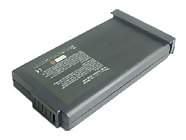
Click to Enlarge
Special Price: £ 24.47
inc. VAT
Brand New, 'A' Grade Cells, Three Years Warranty
Money-Back Guarantee

|
Replacement for COMPAQ 293818-001 Laptop Battery From ELEC
If your original part number or laptop model is not included in the compatibility list, our battery may still fit your laptop. Please feel free to contact us at service@power-supplier.co.uk for confirmation. |
| Battery Type: |
Ni-MH |
| Voltage: |
9.6V |
| Color: |
Dark grey |
| Capacity: |
4000mAh |
| Dimension: |
150.00x77.30x20.00mm |
| Condition: |
New |
| Reusability: |
Rechargeable |
| Upgrade Your Laptop Battery: |
Precision Fit, Easy DIY Install, No Tech Expertise Needed
Give Your Laptop a New Lease on Life, Say goodbye to constant charging |
| Inventory: |
in stock |
|
| coming soon |
|
|
|
| Product Type: Replacement Battery, Rechargeable (Brand New)
Highest quality battery cells
Guaranteed to meet or exceed the specifications of the original.
100% original manufacturer compatible, this 293818-001 battery has been tested, and validated on systems to ensure it will work with your notebook.
Quality Assurance: All products are Certified by CE, FCC for safety. Strict guidelines for compatibility, and standards compliance for environment safety.We specialize in providing quality products from and quality customer service.
Warranty: 36 Months Warranty.
Wholesale Price, Fast Delivery. Secure Online Ordering GuaranteedThe shipping cost for each order is £ 5.95.
|
This Laptop Battery can replace the following part numbers:
COMPAQ
330935-001, 293818-001, 138184-001,
222115-001, 388645-B21, 202960-001,
330986-B21, 347737-002, 293768-002,
116314-001, 197596-001, 347737-001,
338647-001, 293861-001, 292861-001,
222116-001, 388648-001, 222114-001,
332283-001,
This Laptop Battery is also compatible with the following models:
COMPAQ
Presario 12xl300b, Presario 18xl192, Presario 1230,
Presario 1625, Presario 1820, Presario 1236,
Presario 1250, Presario 1272, Presario 1200XL,
Presario 1200XL110, Presario 1200XL300, Presario 1200XL423,
Presario 12XL300, Presario 12XL410, Presario 1600,
Presario 1672, Presario 1693, Presario 1800XL,
Presario 18XL380, Presario 12XL501, Presario 1200la (470013-575),
Presario 1210jp, Presario 1216jp, Presario 1200-xl106,
Presario 1200-xl118, Presario 14xl246, Presario 1210,
Presario 1620, Presario 1681, Presario 1214SR,
Presario 1245, Presario 1266, Presario 1278,
Presario 1200XL105, Presario 1200XL126, Presario 1200XL408,
Presario 1200XL526, Presario 12XL400, Presario 12XL500,
Presario 1635, Presario 1688, Presario 1800T,
Presario 1800XL481, Presario 12XL223, Presario 1200ca (fcan),
Presario 1200t (c/766), Presario 1213ea, Presario 1200-xl102,
Presario 12xl404, Presario 1234, Presario 1650,
Presario 1827, Presario 1240, Presario 1256,
Presario 1274, Presario 1200XL102, Presario 1200XL118,
Presario 1200XL401, Presario 1200XL505, Presario 12XL325,
Presario 12XL426, Presario 1615, Presario 1682,
Presario 1600XL, Presario 1800XL280, Presario 18XL580,
Presario 12XL527, Presario 1200t (1200t C/600), Presario 1211ea,
Presario 1219jp, Presario 1200-xl108, Presario 12xl3,
Presario 18xl191, Presario 1220, Presario 1622,
Presario 1810, Presario 1221, Presario 1247,
Presario 1270, Presario 1280, Presario 1200XL109,
Presario 1200XL3, Presario 1200XL420, Presario 12XL125,
Presario 12XL405, Presario 12XL510, Presario 1670,
Presario 1692, Presario 1800T-850, Presario 18XL280,
Presario 12XL423, Presario 1200ca (us), Presario 1201ap (470013-578),
Presario 1214fr, Presario 1200-xl105, Presario 1200-xl115,
Presario 14xl245, Presario 1207, Presario 1610,
Presario 1680, Presario 1214, Presario 1244,
Presario 1262, Presario 1277, Presario 1200XL104,
Presario 1200XL125, Presario 1200XL406, Presario 1200XL515,
Presario 12XL327, Presario 12XL430, Presario 1630,
Presario 1687, Presario 1800, Presario 1800XL390,
Presario 12XL204, Presario 1200ca (eng), Presario 1200t (c/600),
Presario 1212ea, Presario 1232es, Presario 12xl304,
Presario 1232, Presario 1640, Presario 1825,
Presario 1237, Presario 1255, Presario 1273,
Presario 1200XL101, Presario 1200XL111, Presario 1200XL325,
Presario 1200XL500, Presario 12XL310, Presario 12XL420,
Presario 1611, Presario 1675, Presario 1694,
Presario 1800XL 190, Presario 18XL390, Presario 12XL504,
Presario 1200srp (470013-553), Presario 1210la, Presario 1217jp,
Presario 1200-xl107, Presario 1200-xl119, Presario 14xl247,
Presario 1215, Presario 1621, Presario 1805,
Presario 1216, Presario 1246, Presario 1267,
Presario 1279, Presario 1200XL106, Presario 1200XL127,
Presario 1200XL409, Presario 12XL115, Presario 12XL401,
Presario 12XL505, Presario 1665, Presario 1690,
Presario 1800T-800, Presario 18XL, Presario 12XL4,
Presario 1200ca (fr), Presario 1200t (c/800), Presario 1214ea,
Presario 1200-xl104, Presario 14xl242, Presario 1235,
Presario 1655, Presario 1830, Presario 1242,
Presario 1260, Presario 1275, Presario 1200XL103,
Presario 1200XL119, Presario 1200XL404, Presario 1200XL510,
Presario 12XL326, Presario 12XL427, Presario 1626,
Presario 1685, Presario 1600XL145, Presario 1800XL380,
Presario 18XL590, Presario 1200ap (470011-846), Presario 1200t (470017-081),
Presario 1211la, Presario 1220es, Presario 1200-xl110,
|
|
|
| |
|
|