|
Computer Accessories
Digital Cameras
Audio Multimedia
PDA Accessories
|
|
|
Power-Supplier.co.uk |
|
Replacement for Replacement JPFMR Battery for Dell Chromebook 3100 P90F 65N6H 7T0D3 16DPH 016DPH |
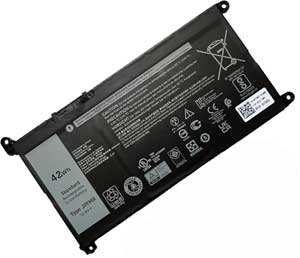
Click to Enlarge
Sale price: £ 36.48
inc. VAT
Brand New, 'A' grade cells, 3 Years Warranty!
|
|
|
| Product Type: Replacement Battery (Brand New)
Highest quality battery cells
In Stock, Guaranteed to meet or exceed the specifications of the original.
100% original manufacturer compatible, this battery has been tested, and validated on systems to ensure it will work with your notebook.
Warranty: Purchasing from us means high quality products and excellent service. We back our quality assurance with an unbeatable 3 year warranty with all new orders.
Wholesale Price, Fast Delivery. Secure Online Ordering Guaranteed.If your original part number or laptop model is not included in the compatibility list, our battery may still fit your laptop. Please feel free to contact us at service@power-supplier.co.uk for confirmation. |
|
|
|
|
|
| Type: |
42Wh |
| Volts: |
11.4V |
| Color: |
Black |
| Capacity: |
42Wh / 3500mAh |
| Dimension: |
mm |
|
This Laptop Battery can replace the following part numbers:
07GDY, 65N6H, 016DPH,
JPFMR, 16DPH, 7T0D3,
This Laptop Battery is also compatible with the following models:
Chromebook 3100 04FHP, Chromebook 3100 7RGRC, Chromebook 3100 DFXFX,
Chromebook 3100 P90F, Chromebook 3100 S004C31002N111US, Chromebook 3100 YPKD0,
Chromebook 3100 2-in-1 877RV, Chromebook 3100 CB3100DXYWS, Chromebook 3100 N014CHB310011EMEA,
Chromebook 3100 S002CHB310011UKIE, Chromebook 3100 VWYN6, Chromebook 3100 1018809312656,
Chromebook 3100 9V222, Chromebook 3100 G4YY1, Chromebook 3100 S001C310011US,
Chromebook 3100 T1N2M, Chromebook 3100, Chromebook 3100 5783K,
Chromebook 3100 D254V, Chromebook 3100 NWMGY, Chromebook 3100 S004C310011US,
Chromebook 3100 W8YJK, Chromebook 3100 1WCWD, Chromebook 3100 CB3100DXYVS,
Chromebook 3100 N012CHB310011EMEA, Chromebook 3100 S002C31002N111US, Chromebook 3100 VH5H8,
Chromebook 3100 0VM5R, Chromebook 3100 921MP, Chromebook 3100 G2GJC,
Chromebook 3100 RHC67, Chromebook 3100 S011C31002N111US, Chromebook 3100 2-in-1 D3PP6,
Chromebook 3100 CB3100DXYXS, Chromebook 3100 NTTW2, Chromebook 3100 S003C310011US,
Chromebook 3100 W4T5R, Chromebook 3100 1HP03, Chromebook 3100 CB3100DXYUS,
Chromebook 3100 J0JW4, Chromebook 3100 S002C310011US, Chromebook 3100 TO015C310011US,
|
|
|
There are several steps you can take to insure that you get maximum performance from your
JPFMR Battery for Dell Chromebook 3100 P90F 65N6H 7T0D3 16DPH 016DPH battery:
Breaking In New
JPFMR Battery for Dell Chromebook 3100 P90F 65N6H 7T0D3 16DPH 016DPH Batteries - new batteries come in a discharged condition and must be fully charged before use. It is recommended that you fully charge and discharge your new battery two to four times to allow it to reach its maximum rated capacity.
Preventing the Memory Effect - Keep your
JPFMR Battery for Dell Chromebook 3100 P90F 65N6H 7T0D3 16DPH 016DPH battery healthy by fully charging and then fully discharging it at least once every two to three weeks. Exceptions to the rule are Li-Ion batteries which do not suffer from the Memory Effect.
Keep Your
JPFMR Battery for Dell Chromebook 3100 P90F 65N6H 7T0D3 16DPH 016DPH Batteries Clean - It's a good idea to clean dirty battery contacts with a cotton swab and alcohol. This helps maintain a good connection between the battery and your portable device.
Exercise Your
JPFMR Battery for Dell Chromebook 3100 P90F 65N6H 7T0D3 16DPH 016DPH Battery - Do not leave your battery dormant for long periods of time. We recommend using the battery at least once every two to three weeks. If a battery has not been used for a long period of time, perform the new battery break in procedure described above.
Battery Storage - If you don't plan on using the battery for a month or more, we recommend storing it in a clean, dry, cool place away from heat and metal objects. Ni-Cd, Ni-MH and Li-Ion batteries will self-discharge during storage; remember to break them in before use.
For Notebook Users - To get maximum performance from your battery, fully optimize the notebook's power management features prior to use. Power management is a trade off: better power conservation in exchange for lesser computer performance. The power management system conserves battery power by setting the processor to run at a slower speed, dimming the screen, spinning down the hard drive when it's not in use and causing the machine to go into sleep mode when inactive. Your notebook user's guide will provide information relating to specific power management features. |
 |
|
|
| Power-Supplier.co.uk is the major online supplier of electronic accessories. We provide high quality replacement power products and technical services for electronics. Such as laptop parts and batteries, camcorder batteries, digital camera batteries, battery chargers, mobile phone batteries, PDA batteries, two-way radio batteries, meomory cards, MP3 player batteries, game player batteries, DVD player batteries, card readers, camcorder case, digital camera case, laptop case, headphones, speakers, keyboards, cell phone accessories and computer accessories. |
|
| Shopping with us is safe and secure. None of our customers have ever reported fraudulent use of their credit cards as a result of shopping with us. You can be assured that the information you give us is confidential. We do not sell, rent or share information of our customers with other parties. |
|
|
|
|