|
Computer Accessories
Digital Cameras
Audio Multimedia
PDA Accessories
|
|
|
Power-Supplier.co.uk |
|
Replacement for Replacement L21C4PD8 L21M4PD8 L21L4PD8 Battery For Lenovo ThinkBook 16 G4+ IAP ARA |
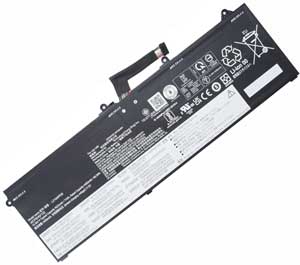
Click to Enlarge
Sale price: £ 43.56
inc. VAT
Brand New, 'A' grade cells, 3 Years Warranty!
|
|
|
| Product Type: Replacement Battery (Brand New)
Highest quality battery cells
In Stock, Guaranteed to meet or exceed the specifications of the original.
100% original manufacturer compatible, this battery has been tested, and validated on systems to ensure it will work with your notebook.
Warranty: Purchasing from us means high quality products and excellent service. We back our quality assurance with an unbeatable 3 year warranty with all new orders.
Wholesale Price, Fast Delivery. Secure Online Ordering Guaranteed.If your original part number or laptop model is not included in the compatibility list, our battery may still fit your laptop. Please feel free to contact us at service@power-supplier.co.uk for confirmation. |
|
|
|
|
|
| Type: |
71Wh |
| Volts: |
15.36V |
| Color: |
Black |
| Capacity: |
71Wh / 4622mAh |
| Dimension: |
mm |
|
This Laptop Battery can replace the following part numbers:
LENOVO
L21M4PD8, L21C4PD8, L21L4PD8,
SB11F09739, L21D4PD8,
This Laptop Battery is also compatible with the following models:
LENOVO
ThinkBook 16 G4 IAP 21CY000EUA, ThinkBook 16 G4 IAP 21CY000GFE, ThinkBook 16 G4 IAP 21CY001CKR,
ThinkBook 16 G4 IAP 21CY001UCK, ThinkBook 16 G4 IAP 21CY001VIV, ThinkBook 16 G4 IAP 21CY002AIW,
ThinkBook 16 G4 IAP 21CY002BMB, ThinkBook 16 G4 IAP 21CY002TPS, ThinkBook 16 G4 IAP 21CY002YAK,
ThinkBook 16 G4 IAP 21CY0032SA, ThinkBook 16 G4 IAP 21CY0037AD, ThinkBook 16 G4 IAP 21CY003BPE,
ThinkBook 16 G4 IAP 21CY003YMJ, ThinkBook 16 G4 IAP 21CY004NMB, ThinkBook 16 G4 IAP 21CY004PRM,
ThinkBook 16 G4 IAP 21CY0057PK, ThinkBook 16 G4 ARA 21D10029VN, ThinkBook 16 G4 IAP 21CY000FRU,
ThinkBook 16 G4 IAP 21CY000GUE, ThinkBook 16 G4 IAP 21CY001RUA, ThinkBook 16 G4 IAP 21CY001USC,
ThinkBook 16 G4 IAP 21CY002AAT, ThinkBook 16 G4 IAP 21CY002BAD, ThinkBook 16 G4 IAP 21CY002RFG,
ThinkBook 16 G4 IAP 21CY002WPK, ThinkBook 16 G4 IAP 21CY0031FE, ThinkBook 16 G4 IAP 21CY0035PE,
ThinkBook 16 G4 IAP 21CY0039UE, ThinkBook 16 G4 IAP 21CY003HVN, ThinkBook 16 G4 IAP 21CY004MTW,
ThinkBook 16 G4 IAP 21CY004PIW, ThinkBook 16 G4 IAP 21CY004YMB, ThinkBook 16 G4 IAP 21CY005PTA,
ThinkBook 16 G4 ARA 21D1001KVN, ThinkBook 16 G4 IAP 21CY000EMH, ThinkBook 16 G4 IAP 21CY000FFR,
ThinkBook 16 G4 IAP 21CY000GML, ThinkBook 16 G4 IAP 21CY001MRU, ThinkBook 16 G4 IAP 21CY001UGM,
ThinkBook 16 G4 IAP 21CY001VRE, ThinkBook 16 G4 IAP 21CY002APB, ThinkBook 16 G4 IAP 21CY002BSA,
ThinkBook 16 G4 IAP 21CY002VAX, ThinkBook 16 G4 IAP 21CY002YUE, ThinkBook 16 G4 IAP 21CY0034AK,
ThinkBook 16 G4 IAP 21CY0037SA, ThinkBook 16 G4 IAP 21CY003CSA, ThinkBook 16 G4 IAP 21CY0048HH,
ThinkBook 16 G4 IAP 21CY004NSP, ThinkBook 16 G4 IAP 21CY004QAD, ThinkBook 16 G4 IAP 21CY0058FG,
ThinkBook 16 G4 ARA 21D1000DKR, ThinkBook 16 G4 IAP 21CY000EDS, ThinkBook 16 G4 IAP 21CY000ERA,
ThinkBook 16 G4 IAP 21CY000GDT, ThinkBook 16 G4 IAP 21CY0015RU, ThinkBook 16 G4 IAP 21CY001TRU,
ThinkBook 16 G4 IAP 21CY001VFE, ThinkBook 16 G4 IAP 21CY002AFG, ThinkBook 16 G4 IAP 21CY002BKG,
ThinkBook 16 G4 IAP 21CY002SUE, ThinkBook 16 G4 IAP 21CY002XFG, ThinkBook 16 G4 IAP 21CY0032PK,
ThinkBook 16 G4 IAP 21CY0036FE, ThinkBook 16 G4 IAP 21CY003BFE, ThinkBook 16 G4 IAP 21CY003PMH,
ThinkBook 16 G4 IAP 21CY004NGE, ThinkBook 16 G4 IAP 21CY004PPB, ThinkBook 16 G4 IAP 21CY0057AD,
ThinkBook 16 G4 ARA 21D10022VN, ThinkBook 16 G4 IAP 21CY000FPE, ThinkBook 16 G4 IAP 21CY000GRE,
ThinkBook 16 G4 IAP 21CY001QRE, ThinkBook 16 G4 IAP 21CY001UPE, ThinkBook 16 G4 IAP 21CY001VYA,
ThinkBook 16 G4 IAP 21CY002ASA, ThinkBook 16 G4 IAP 21CY002PCK, ThinkBook 16 G4 IAP 21CY002WAD,
ThinkBook 16 G4 IAP 21CY0031AX, ThinkBook 16 G4 IAP 21CY0034UE, ThinkBook 16 G4 IAP 21CY0039ED,
ThinkBook 16 G4 IAP 21CY003DPK, ThinkBook 16 G4 IAP 21CY004KTA, ThinkBook 16 G4 IAP 21CY004PFG,
ThinkBook 16 G4 IAP 21CY004QSA, ThinkBook 16 G4 IAP 21CY005KKR, ThinkBook 16 G4 ARA 21D10016PH,
ThinkBook 16 G4 IAP 21CY000EIU, ThinkBook 16 G4 IAP 21CY000FAX, ThinkBook 16 G4 IAP 21CY000GIV,
ThinkBook 16 G4 IAP 21CY001EKR, ThinkBook 16 G4 IAP 21CY001UFR, ThinkBook 16 G4 IAP 21CY001VMZ,
ThinkBook 16 G4 IAP 21CY002AKG, ThinkBook 16 G4 IAP 21CY002BPG, ThinkBook 16 G4 IAP 21CY002UFE,
ThinkBook 16 G4 IAP 21CY002YPS, ThinkBook 16 G4 IAP 21CY0033FG, ThinkBook 16 G4 IAP 21CY0037AX,
ThinkBook 16 G4 IAP 21CY003CAX, ThinkBook 16 G4 IAP 21CY0041PH, ThinkBook 16 G4 IAP 21CY004NPG,
ThinkBook 16 G4 IAP 21CY004PSA, ThinkBook 16 G4 IAP 21CY0058ED, ThinkBook 16 G4 IAP 21CY000EAD,
ThinkBook 16 G4 IAP 21CY000GAK, ThinkBook 16 G4 IAP 21CY000GYA, ThinkBook 16 G4 IAP 21CY001TRA,
ThinkBook 16 G4 IAP 21CY001VAK, ThinkBook 16 G4 IAP 21CY002ABM, ThinkBook 16 G4 IAP 21CY002BGE,
ThinkBook 16 G4 IAP 21CY002SED, ThinkBook 16 G4 IAP 21CY002XED, ThinkBook 16 G4 IAP 21CY0032AD,
ThinkBook 16 G4 IAP 21CY0035PS, ThinkBook 16 G4 IAP 21CY003APS, ThinkBook 16 G4 IAP 21CY003KPB,
ThinkBook 16 G4 IAP 21CY004NCY, ThinkBook 16 G4 IAP 21CY004PKG, ThinkBook 16 G4 IAP 21CY0056MH,
ThinkBook 16 G4 ARA 21D1001SSB, ThinkBook 16 G4 IAP 21CY000EPK, ThinkBook 16 G4 IAP 21CY000FIX,
ThinkBook 16 G4 IAP 21CY000GMZ, ThinkBook 16 G4 IAP 21CY001QKG, ThinkBook 16 G4 IAP 21CY001ULT,
ThinkBook 16 G4 IAP 21CY001VRU, ThinkBook 16 G4 IAP 21CY002ARM, ThinkBook 16 G4 IAP 21CY002BSP,
ThinkBook 16 G4 IAP 21CY002VSA, ThinkBook 16 G4 IAP 21CY0030PE, ThinkBook 16 G4 IAP 21CY0034ED,
ThinkBook 16 G4 IAP 21CY0038FG, ThinkBook 16 G4 IAP 21CY003DAD, ThinkBook 16 G4 IAP 21CY004FPH,
ThinkBook 16 G4 IAP 21CY004PAT, ThinkBook 16 G4 IAP 21CY004QPK, ThinkBook 16 G4 IAP 21CY005AVN,
ThinkBook 16 G4 ARA 21D10012KR, ThinkBook 16 G4 IAP 21CY000EGM, |
|
|
There are several steps you can take to insure that you get maximum performance from your
L21C4PD8 L21M4PD8 L21L4PD8 Battery For Lenovo ThinkBook 16 G4+ IAP ARA battery:
Breaking In New
L21C4PD8 L21M4PD8 L21L4PD8 Battery For Lenovo ThinkBook 16 G4+ IAP ARA Batteries - new batteries come in a discharged condition and must be fully charged before use. It is recommended that you fully charge and discharge your new battery two to four times to allow it to reach its maximum rated capacity.
Preventing the Memory Effect - Keep your
L21C4PD8 L21M4PD8 L21L4PD8 Battery For Lenovo ThinkBook 16 G4+ IAP ARA battery healthy by fully charging and then fully discharging it at least once every two to three weeks. Exceptions to the rule are Li-Ion batteries which do not suffer from the Memory Effect.
Keep Your
L21C4PD8 L21M4PD8 L21L4PD8 Battery For Lenovo ThinkBook 16 G4+ IAP ARA Batteries Clean - It's a good idea to clean dirty battery contacts with a cotton swab and alcohol. This helps maintain a good connection between the battery and your portable device.
Exercise Your
L21C4PD8 L21M4PD8 L21L4PD8 Battery For Lenovo ThinkBook 16 G4+ IAP ARA Battery - Do not leave your battery dormant for long periods of time. We recommend using the battery at least once every two to three weeks. If a battery has not been used for a long period of time, perform the new battery break in procedure described above.
Battery Storage - If you don't plan on using the battery for a month or more, we recommend storing it in a clean, dry, cool place away from heat and metal objects. Ni-Cd, Ni-MH and Li-Ion batteries will self-discharge during storage; remember to break them in before use.
For Notebook Users - To get maximum performance from your battery, fully optimize the notebook's power management features prior to use. Power management is a trade off: better power conservation in exchange for lesser computer performance. The power management system conserves battery power by setting the processor to run at a slower speed, dimming the screen, spinning down the hard drive when it's not in use and causing the machine to go into sleep mode when inactive. Your notebook user's guide will provide information relating to specific power management features. |
 |
|
|
| Power-Supplier.co.uk is the major online supplier of electronic accessories. We provide high quality replacement power products and technical services for electronics. Such as laptop parts and batteries, camcorder batteries, digital camera batteries, battery chargers, mobile phone batteries, PDA batteries, two-way radio batteries, meomory cards, MP3 player batteries, game player batteries, DVD player batteries, card readers, camcorder case, digital camera case, laptop case, headphones, speakers, keyboards, cell phone accessories and computer accessories. |
|
| Shopping with us is safe and secure. None of our customers have ever reported fraudulent use of their credit cards as a result of shopping with us. You can be assured that the information you give us is confidential. We do not sell, rent or share information of our customers with other parties. |
|
|
|
|